
“Why does one price quote succeed while another fails?” The answer is not in the price alone, but in the way you present your value. A professional price quote is the key to turning prospects into long-term partners. It is the golden opportunity that decides whether a deal closes or slips away.
In this article, we will walk you through a complete guide that covers not only how to prepare a professional price quote, but also the secrets of profitable pricing, along with a set of ready-to-use quote templates you can download for free.
Get ready to learn how to design a quote that simply cannot be refused.
What is a price quote?
A price quote is a formal document submitted by the seller to a prospective buyer, containing a precise description of the requested products or services, along with prices, payment terms, and the validity period of the offer. It is one of the most essential tools in the sales cycle. Its role is not limited to setting cost; it also reflects the professionalism of the business and shows how clear and transparent it is in its dealings.
A quote is the starting point of any successful commercial relationship. It helps customers make informed decisions based on clear information, and gives the company an opportunity to showcase the added value it offers and the competitive advantages that set its services apart. When a quote is accurate, detailed, and carefully formatted, it earns customer trust, motivates the buying decision, and strengthens the chances of building a long-term relationship grounded in credibility and professionalism.
Elements of a professional price quote: an essential checklist
The key items every quote template should include are:
Clear description of products or services
The quote must be clear and detailed about the products or services being offered, with the benefits and value the customer will receive upon purchase.
Defined pricing
Prices must be stated clearly and understandably, whether fixed or negotiable. The quote should also include any additional fees that may apply, such as sales tax or shipping costs.
Additional details
A quote can include extra details that help the buyer make a decision, such as examples of previous work, customer testimonials, warranties, or after-sales services.
Time and validity
Some offers require a defined validity period or a purchase deadline at a specific price. These conditions must be stated explicitly in the quote.
Payment options
The quote should list available payment methods, whether cash, credit card, bank transfer, or others. Additional payment policies such as installment plans or cash discounts should also be spelled out.
Quote template
Items inside a price quote
A business-to-business price quote is an important tool in the buying and selling process. Its line items carry the information needed to ensure clarity and transparency between seller and buyer. The most important are:
Date the quote was issued
The day and date when the quote is submitted must be specified, since this fixes the period during which the offer is valid and binding.
Quote expiration date
Because prices may change, an expiration date should be set to avoid confusion if the offer remains open for too long.
Seller and buyer information
Include the details of both seller (issuer of the quote) and buyer (recipient): business name, address, email, and tax number. This information strengthens transparency and makes communication between the parties easier.
Product or service description
A detailed description of the products or services should appear in the quote. This removes ambiguity about the nature of what is being offered and prevents disputes between buyer and seller later on.
Quantity of product or service
The agreed quantity of the product or service must be stated. This sets the total cost and avoids confusion over volumes.
Unit price
The unit price of the product or service is one of the main inputs for calculating the total cost.
Tax, if applicable
If a tax applies to the product or service, this must be shown in the line items so there is no confusion about the added tax cost. In Saudi Arabia, VAT is 15%.
Total cost
The total cost is shown after calculating unit price, quantity, and tax where applicable. This is one of the main figures the customer looks at when deciding to buy.
Additional notes
If there are extra notes related to delivering the product or service, such as shipping or storage instructions, they should be added here. These notes clarify any further details that must be taken into account in execution.
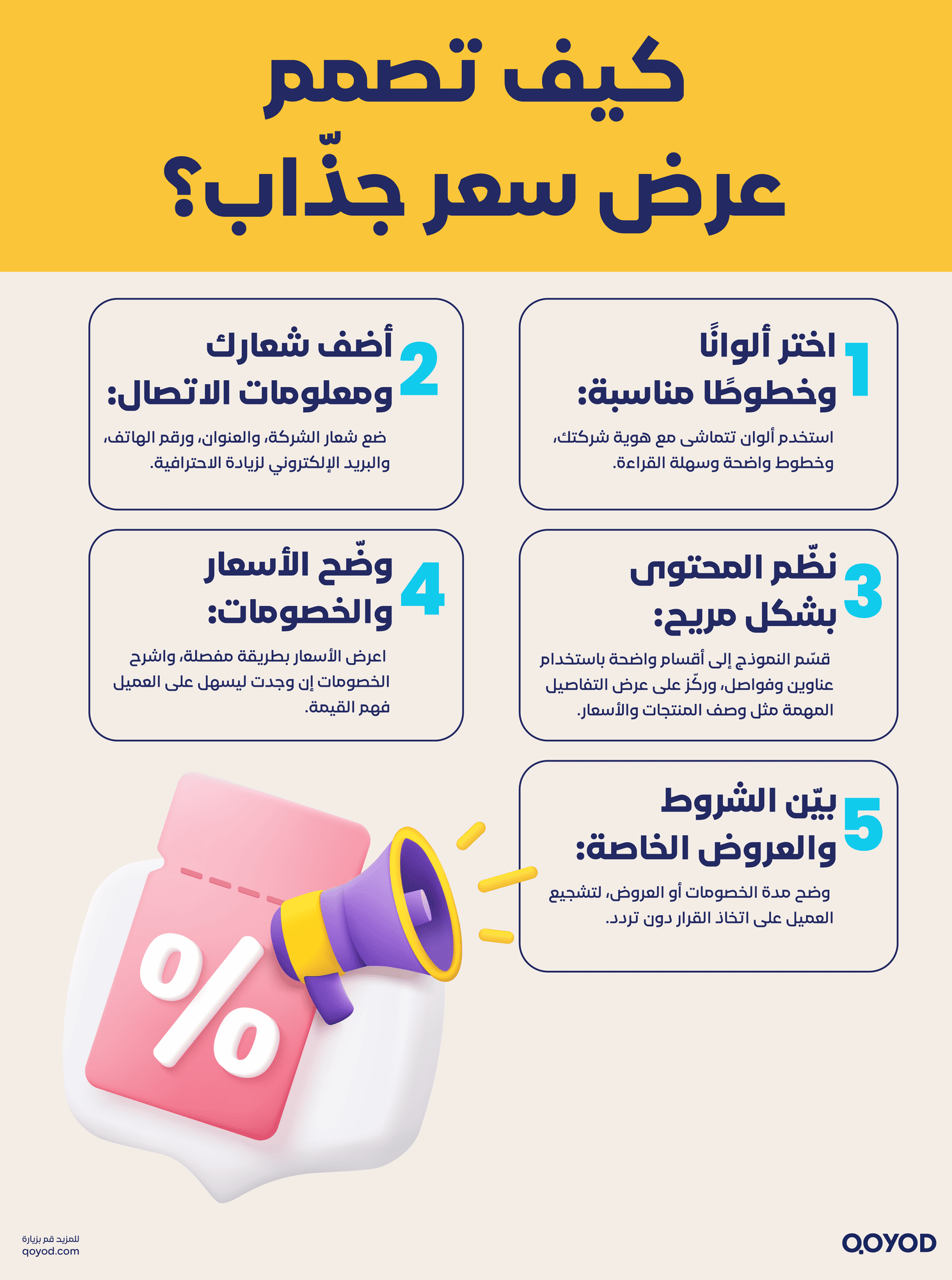
How do you design an attractive price quote? 5 tips for professional formatting
When formatting and designing a quote template in PDF or Word, there are several points that make the document attractive and easy to read. They can be summarized as follows:
Use the right colors and fonts
- Brand-aligned colors: choose colors that match the company’s identity and reflect its credibility.
- Complementary palette: pick colors that work well together and keep the content easy to read.
- Readable fonts: select clear, legible fonts and avoid decorative ones that hurt readability.
Add the logo and company details
- Company logo: include the logo to reinforce brand identity and distinguish the business from others.
- Company contact details: include address, phone, email, and any other contact information the customer might need.
Organize sections and content clearly
- Logical structure: organize sections and content so they are easy to read and understand.
- Headings and separators: use them to break content into digestible blocks.
- Comprehensive content: cover all important details such as product or service descriptions and their prices.
Clarify prices and discounts
- Transparent pricing: quote templates must be clear about prices and any discounts offered.
- Pricing breakdown: show how prices are calculated and what discounts are available in detail.
- Customer confidence: this helps customers understand the value they will receive and increases trust in the business.
Details of discounts and special offers
- Highlight promotions: clearly state any discounts or special offers the template includes.
- Terms and duration: define conditions and validity periods for discounts and offers precisely.
- Easy uptake: this helps customers take advantage of offers and avoids confusion or misunderstanding.
Quote templates
A price quote is more than a list of numbers. It is a golden opportunity to leave a professional impression on the customer, and every industry has its own way of presenting one.
For this reason, we have put together a set of the best ready-to-download quote templates you can use easily:
- Contracting quote template: ideal for businesses delivering construction and maintenance projects.
- E-commerce quote template: designed specifically for online stores and wholesale orders.
- Restaurant quote template: helps you organize event and catering offers in a professional way.
Click here to download the templates and use them directly in your business.
Common mistakes in price quotes you must avoid
A successful quote depends on more than the basic line items. It also requires avoiding the mistakes that can cost you the deal. Watch out for these:
- Unclear service description: do not assume the customer knows exactly what you offer. Be detailed and precise in describing every product or service to prevent misunderstandings.
- Ignoring the expiration date: leaving the offer open forever removes any urgency for the customer to decide quickly.
- Inflexible pricing: do not give a single price. Offer multiple options (such as a basic, professional, and comprehensive package) so the customer feels in control of the choice.
- Focusing on price instead of value: do not turn your quote into a bare price list. Focus on the benefits the customer will get and how your product or service solves their problem.
The art of pricing: how to make your offer psychologically attractive
Here is a section that adds value beyond the basics:
- Price-splitting strategy: instead of stating one large total, break it into smaller units. For example, if the total is 45,000 SAR, present it as “just 3,750 SAR per month” or “the equivalent of 125 SAR per day”.
- Value before price: describe the benefits and advantages the customer will gain before mentioning the price. This way they see the value first, then the price feels logical and justified.
- “Charm” pricing: use numbers ending in 99 (such as 9,999 SAR instead of 10,000 SAR). This psychological trick makes the price feel meaningfully lower in the customer’s mind.

Quotes in Qoyod (Quotation)
A quote is a document you send to your customer with approximate prices and specific terms and conditions agreed between you. Once the customer accepts it, you can convert it into an invoice with a single click and continue with sending the invoice and tracking payments.
To create a new quote, follow these steps:
- Go to Quotes from the Sales dropdown menu and click the (+) icon.
- Select the customer who will receive the quote, and enter the issue and expiration dates.
- Choose the service or product and set your prices.
- You can add terms and conditions to the quote, along with any notes you want to appear when creating a new quote. You can also standardize the terms and conditions of all quotes through Quote settings under General Settings.
- You can also add any attachments you need.
- Additional information: you can assign the quote to a project, or fill in additional fields linked to the invoicing and quoting service. See the guide on custom fields for more.
By clicking “Save and approve”, the quote will be created.
- After saving, the Quotes page appears, which is made up of three parts:
- A chart that classifies quotes by status (sent, invoiced, approved, draft).
- The search fields under the chart let you look up quote numbers and filter quotes by the criteria shown.
- Below the search fields, the list of quotes begins.
View: to see the details of a quote.
Print: to print the quote.
Download PDF: to download the file in PDF format.
Duplicate: to copy the quote.
Send: to send the quote to the customer’s email.
Convert to invoice: to turn the quote into an invoice once the customer approves it.
Edit: to modify the quote.
Cancel: to cancel the quote. Accounts are not affected by cancellation as long as the quote has not been converted to an invoice, and it stays saved with status “cancelled”.
Delete: to remove the quote from the list of quotes.
After converting a quote into an invoice, you can continue the process using the same steps as invoices and receiving customer payments.
You can watch a short, easy-to-follow video that shows how to create a quote from your phone using the Qoyod app. Watch now.
Conclusion
Presenting a price quote is a key step in attracting customer interest and closing successful business. It is the moment when the customer decides whether to buy or invest. When the offer is compelling and reflects real value for the product or service, it captures the customer’s attention and sparks the desire to move forward.
Clarity and transparency in a quote are key factors in winning that attention. Providing detailed information about the price of the product or service, including added benefits and possible discounts, gives the customer confidence and a sense of security.
The quote also needs to be balanced against the value of what is being offered. When the customer sees that the price matches the quality and benefits they will receive, they become more willing to pay and invest.
Businesses present quotes in a way that grabs attention and sparks interest using a capable accounting platform like Qoyod, which encourages customers to make a quick decision and seize the opportunity.
It is worth noting that Qoyod provides all its customers with e-invoicing systems, a point-of-sale (POS) system, warehouse and customer management, and other services that simplify running a business.
Now that you understand what a price quote is and how to present one, try Qoyod free for 14 days, and enjoy fair pricing and professional services in the Kingdom of Saudi Arabia.
Join our inspiring community. Follow us on LinkedIn and Twitter to be the first to see our latest articles and updates. A chance to learn and grow in the world of accounting and finance. Do not miss out, join today.
FAQ
What makes a price quote “professional” and successful?
Success does not depend on offering the lowest price, but on leading with value. A successful quote is a formal document with full clarity in describing the services, that highlights competitive advantages, and defines payment terms and validity, building instant trust with the customer.
What are the six essential elements every quote must include?
The quote must include: details of both parties (seller and buyer), a precise description of products and services, unit price and quantity, total cost including VAT (15%), available payment options, and an expiration date to drive a quick decision.
How do I avoid the common mistakes that lead to a rejected quote?
Avoid vague service descriptions and never overlook the expiration date. Most importantly, use psychological pricing strategies (such as splitting the price or offering multiple packages) instead of a single rigid number, so the customer feels in control of the choice.
How does Qoyod turn a quote into a financial record with one click?
Qoyod lets you build and customize the quote in full, with attachments and terms. Once the customer accepts, you can convert it into a sales invoice automatically, speeding up the document cycle and keeping a clean link between what was agreed and what will actually be collected.