
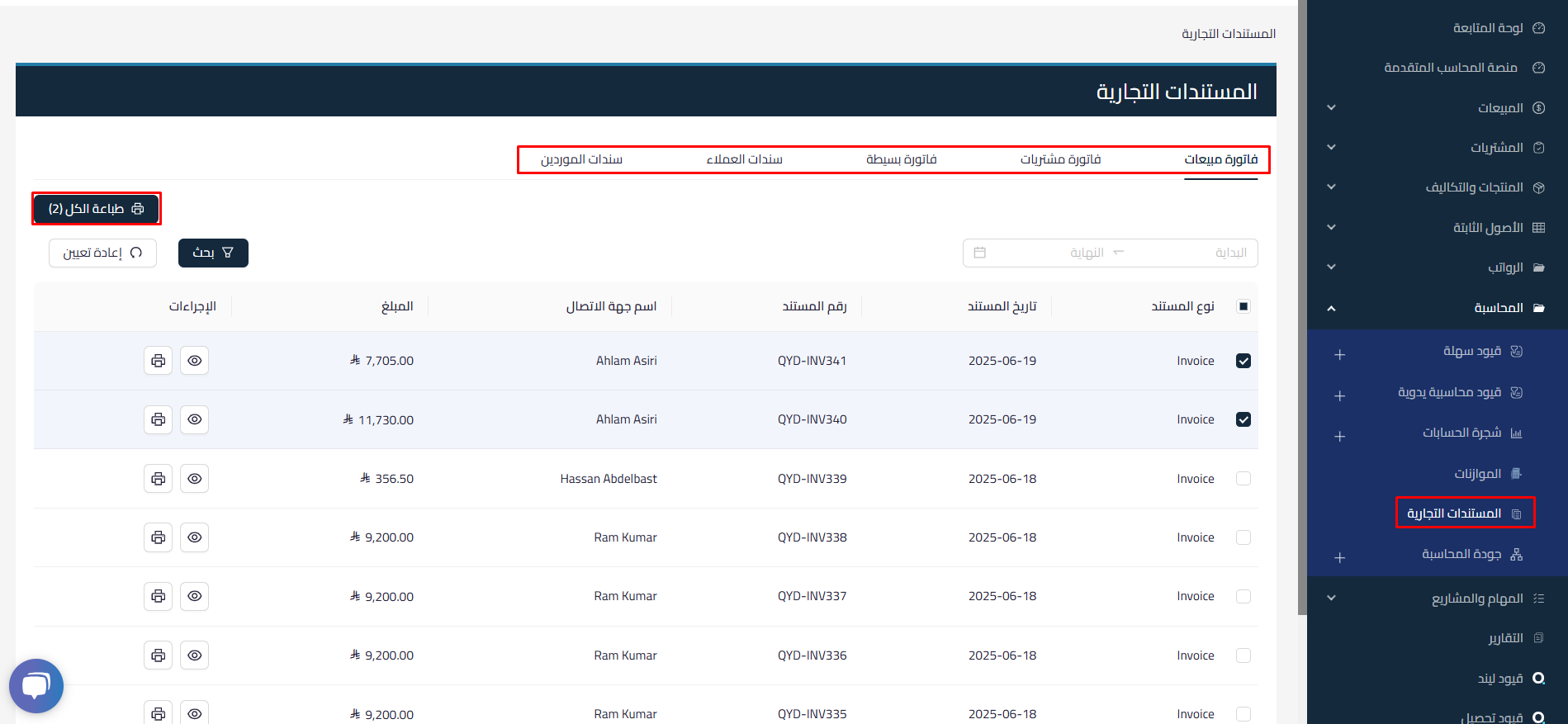
Overview
This release of Qoyod introduces a feature for viewing and printing journal entries related to commercial documents. Users can now efficiently access and print journal entries associated with specific commercial documents, enhancing transparency and simplifying records management.
New features
1. Print related journal entries
Users can print journal entries linked to specific commercial documents directly from the interface.
2. View journal entries
A dedicated section for viewing all journal entries related to each commercial document, with filter options to search by document type for quick retrieval.
3. Bulk print function
Users can select multiple commercial documents and print their associated journal entries in a single operation.
4. User-friendly interface
An improved design for easier navigation within the commercial documents section, with tooltips and help prompts to guide users in using the new features effectively.
Benefits
- Simplified record-keeping: Streamlines organized record-keeping by enabling users to easily print and view related journal entries.
- Time savings: Quick access to related journal entries reduces the time spent searching for documents.
- Improved financial transparency: Provides clearer visibility into financial transactions linked to commercial documents.
How to use it
- Go to the Commercial Documents section in the Qoyod accounting system.
- Select a specific commercial document to view its related journal entries.
- Click the “Print” button to generate and print the related journal entries.
Learn about Qoyod and how it enhances financial transparency by linking commercial documents to journal entries.